Track your Marks of Excellence (MoE) progress for the vehicle you have selected, in the Garage and live in battle.
What it shows
Garage MoE bar
A percentile bar in the vehicle-parameters panel with milestone ticks at 65% / 85% / 95%. Every tick is labelled with the combined damage that mark requires, plus a fourth number for 100%, the top of the distribution.
Ctrl+drag the bar to reposition it (hold Shift to lock one axis). It can also optionally shift with the vehicle carousel so it never overlaps.
Weekly MoE trend chart — the vehicle’s mark tooltip shows a “Last 7 Days” chart: one dot per battle on a percentile axis, horizontal mark lines at 65% / 85% / 95% / 100%, day dividers, and an end-of-day moving-average label for each day.
In-battle overlay
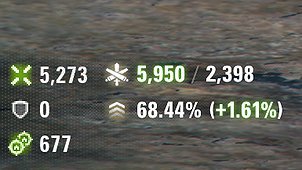
A compact overlay over the HUD with two lines:
- Live combined damage vs your projected average — the number is coloured by sign (red below your projection, white at it, green above).
- Your projected MoE percentage with the signed change versus where you started the battle.
- An optional third line shows your counted assistance — the highest of track / spot / stun damage, with the icon of whichever is leading.
The overlay can be set to appear only while you hold Alt.
In-battle progress bar
An optional bar that fades in when damage is dealt or assistance is counted. Hold Alt to summon it at any time. Two variants, one chosen in the settings:
- Moving Average — where your career projected average combined damage sits between the mark you already hold and the next mark’s requirement, with the requirement on each end, your pre-battle average marked on the axis, and this battle’s signed contribution.
- Damage Efficiency — this battle’s combined damage against all four requirements (65% / 85% / 95% / 100%) on four equal quarters. Each requirement lights up as you pass it and the bar recolours with it — white, green, blue, violet, then gold at 100% — flashing the signed increment of the hit that just landed.
Settings
Everything is toggleable from the Modification list window (ModsSettingsAPI): the in-battle overlay, its Alt-only mode and its assistance line, the Garage bar and its pinned position, and the centre progress bar with its variant. The settings panel is translated into 11 languages and follows your client automatically. Your settings carry over when you update the mod.
Free to include in modpacks with credit and a link — ship the .wotmod and list OpenWG GameFace as a dependency.
Inspired by other MoE calculators/trackers, specifically lebwa’s.