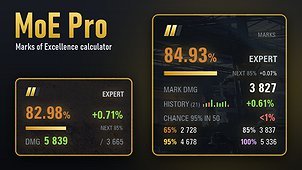
MoE Pro shows everything about your Marks of Excellence in one place: in the hangar, in battle and in a details window.
HANGAR PANEL
• Exact mark percentage and the marks already earned
• Progress bar to the next mark and how much is left
• Mark damage: the average the game builds your mark from
• History: your net change while playing with the mod, last battles as bars (you choose how many)
• Chance to get the next mark within 50 battles
• Damage thresholds for 65 / 85 / 95 / 100 %
IN BATTLE
• Live forecast of your percentage after this battle, updated with every hit and assist
• Your combined damage (damage + best assist) against your mark damage
• Thresholds on Alt; the panel tells you when a mode does not count for marks
DETAILS WINDOW (click the panel, Ctrl+M or the mods list)
TANK tab:
• Mark history battle by battle: percent before and after, damage, net change, best and worst battle, trend
• Threshold history for 30 days (change over 7 and 30 days) and how much the threshold drift alone moved your percentage
• Next mark: damage needed, chance within 10 / 25 / 50 / 100 battles, average damage needed, typical number of battles
• Your stats on the tank with the mod: average and median, best battle, damage and assist, share of battles that raised the mark, win rate
MY TANKS tab: every tier V+ tank in your garage with marks, percentage, what is left to the next mark and the chance. Sortable, with pages.
HOW IT WORKS
The mark is a moving average of your combined damage (each battle weighs 2/101). The mod reads the exact percentage from your service record and the official damage distribution from the Wargaming API, refreshed daily. Checked on real battles, the forecast matches the game’s final percentage to hundredths of a percent. Chances are calculated from your own battles with the mod.
• Russian and English interface
• Panels can be moved and resized; settings in ModsSettingsAPI
• History is stored only on your PC (mods/configs/moe_pro)
Included in the archive: GUIFlash (required), ModsSettingsAPI (settings window), ModsListAPI (mods list button that opens the settings) and net.openwg.gameface (needed by ModsListAPI).
AUTHOR
• YouTube: https://www.youtube.com/channel/UC0mWMmHafPvaleZH2Tz2waw
• Discord (questions, bugs, ideas): https://discord.gg/z6HfMqjVZQ