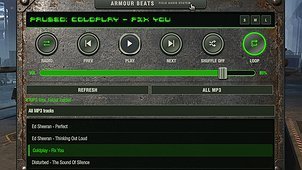
Armour Beats brings your music into World of Tanks, with local MP3 playback and optional internet radio in both the garage and battle.
Its weathered steel design features illuminated controls, a metal volume slider and three panel sizes:
• Small: a compact now-playing display.
• Medium: playback controls and volume.
• Large: the full player with track lists, playlists and radio controls.
LOCAL MUSIC & PLAYLISTS
Choose your MP3 folder and Armour Beats includes tracks from its subfolders. Play the whole library or create your own playlists by selecting individual tracks. Edit existing playlists, add or remove tracks, change their order, and save your changes or create a separate copy.
PLAYBACK MODES
• Off: play the selected track, then stop.
• Loop: repeat the current playlist.
• Once: finish the current playlist, then stop.
• Next List: continue to the next playlist, stopping after the final one.
Shuffle works independently of the playback mode and avoids repeating tracks within each automatic pass.
INTERNET RADIO
Search stations by name and country, browse popular stations or enter a direct stream URL. Radio requires VLC desktop and an internet connection. Local MP3 playback does not require VLC.
CUSTOMISATION
With Aslain Mod Menu installed, adjust the font size, choose a track-display font and change the accent colour used by the display, illuminated buttons and highlights.
Armour Beats also works without Aslain Mod Menu. Folder and playlist controls remain available in the large panel, using the default font and amber accent colour.
KEYBOARD SHORTCUTS
Hold Ctrl + Alt, then press:
• Up / Down: increase or decrease volume by 5%.
• Left / Right: previous or next MP3 track.
Drag the track-display strip to reposition any panel, or use the nameplate on the large panel. Your music folder and window position are remembered between sessions.
Special thanks to gravity_assist, whose website and helpful pointers were instrumental in bringing Armour Beats to life.