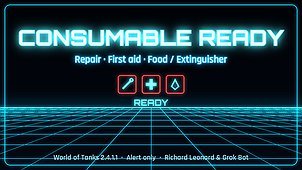
Consumable Ready puts your repair kit, first aid kit and food or fire extinguisher icons in a small stack near the crosshair, so you can see what is ready without looking down at the panel. When a kit comes off cooldown, a short chime plays.
Alert only: it watches the cooldowns the game already shows. It never uses a consumable for you and never blocks, delays or triggers anything.
What you see
– Three slots, top to bottom: repair kit, first aid kit, then food or fire extinguisher (whichever you carry).
– Uses the game’s own kit icons (loaded from the client, not included in the file).
– Ready: full brightness with a red outline. On cooldown: dimmed with a whole-second countdown. Used up: stays dimmed.
– Small and large kits both count; when you carry a small one, its icon shows in that slot.
– The stack sits just left of where the Ares Heat Bar goes (right of the crosshair). It works without the heat bar; if the heat bar is installed it lines up with it and shares its volume.
Sounds
Four short original chimes made for this mod (repair, first aid, extinguisher, and a general “ready” chime used for food). They are synthesized tones released as CC0, credits in the file. Silent at battle start, in replays and after your tank is destroyed. To use your own sound, drop a 16-bit 44.1 kHz mono WAV in mods/configs/consumable_ready/sounds/ and set readySound, repairSound, medSound or extinguisherSound “file” to it. Sound plays through a small hidden Windows PowerShell helper.
Which vehicles (taken from the code, not guessed)
– All nations and all vehicle classes: light, medium, heavy, tank destroyers and SPGs. There is no nation, class or vehicle filter.
– Ares tanks: same as any other vehicle, and the stack lines up next to the Ares Heat Bar.
– Czechoslovak light tanks: no special handling here (their clip warning is in Clip Chime).
– A slot only shows when you carry a matching consumable. includeSmallKits, includeFood and includeExtinguishers (all on by default) let you hide some.
Hotkey
Ctrl+Shift+K: mute or unmute the chime (icons stay). Volume follows the Ares Heat Bar’s Ctrl+Shift+PgUp/PgDn if installed, otherwise 100%.
Needs GUIFlash 0.6.7 (not included): https://github.com/CH4MPi/GUIFlash/releases/tag/v0.6.7
By Richard Leonard and Grok Bot. MIT License.