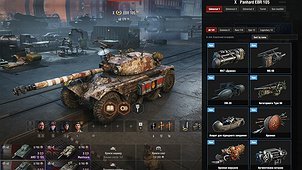
Put any 3D attachment from the game on your tank, locally, and see it right away in the hangar and in battle.
What it does
– Opens a window with picture tiles (in the style of a styles aggregator) from the hangar “Mods” list (or with Ctrl+F9 if ModsListAPI is not installed).
– Shows only attachments that really fit the current tank, and only the slots that tank actually has. The game’s own rules are used (item.mayInstall, visible slots, slot type, scale limits), so nothing illegal is offered.
– One tab per slot (universal, turret, gun mantlet, gun…). Click a tile and the attachment appears on the tank instantly.
– Filter by name, sort by name or by rarity, and show a single rarity only (Common / Rare / Epic / Legendary) with counters. Rarity badges on the tiles.
– You can still rotate and zoom the hangar tank while choosing: drag with the left mouse button on the empty part of the screen, use the wheel there to zoom.
– The choice is saved per tank and applied automatically in the hangar and in battle (on your own tank).
– Attachment animations and effects play as on real attachments.
– If you use the User Customization aggregator (valberton.userCustomization), your own attachments are kept on top of its styles. The other mod is not modified.
How it works
Everything is client-side and cosmetic. The mod wraps Vehicle.getOutfit (hangar) and CompoundAppearance._prepareOutfit (battle, own tank) and adds the chosen attachments to the outfit the client draws. Nothing is sent to the server, so other players do not see your attachments. Local attachments are never added to the standard customization screen, so they cannot end up in a server request. Every entry is checked against the game’s own rules before use, and any error falls back to the original outfit.
Requirements
– World of Tanks 2.4.0.2 (tested on EU).
– OpenWG Gameface (net.openwg.gameface 1.1.5 or newer): required, not included.
– ModsListAPI (me.poliroid.modslistapi 1.7.9): optional, not included. It adds the button to the Mods list; without it, press Ctrl+F9 in the hangar.
If something is missing, the mod shows a message in the hangar telling you what to install.
Notes
– The mod’s interface is in English; attachment names are shown in your game client’s language.
– In battle the attachments are shown on your own tank only.
– While the window is open, other clicks in the hangar are blocked (close it with the cross or Esc).
– A few attachments may fail to load a texture on some installs; this is a property of the item, not of the mod.
– Source code is included in the archive. Created with the help of AI (Claude by Anthropic). Not affiliated with Wargaming.