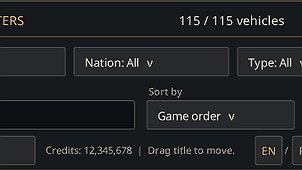
Filter and sort recoverable vehicles, search by name and show only vehicles you can afford to recover.
Recovery Filters adds a compact panel to Depot → Vehicles in the Garage → Recovery, making it easier to find the vehicles you want to recover.
- Filter by Tier, Nation and vehicle type. Select multiple values and combine filters.
- Search by vehicle name.
- Sort by Game order, Tier, Nation, Type, Name or Recovery cost. Game order preserves the game’s original ordering and is used by default and after Reset.
- Enable Can afford to show only vehicles whose recovery cost does not exceed your current credits balance. This option is disabled by default and works together with the other filters.
- Move the panel by dragging its header, or collapse it with − / +. Your filters, sorting and panel position are remembered between sessions.
- Use the interface in English or Russian. Russian is selected automatically for a Russian client; English is used for all other client languages. The EN / RU buttons let you choose independently, and your choice is saved.