Brings the gun caliber and the shell name back to the ammunition tooltips in battle.
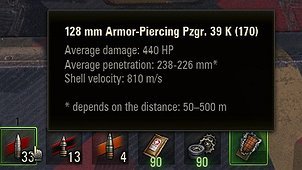
Wargaming used to head that tooltip with the full shell name — “128 mm Armor-Piercing Pzgr. 39 K (170)” — and at some point cut it down to just the shell kind, “Armor-Piercing”. The caliber went with it. This mod puts it back.
WHAT IT DOES
Hovering a shell on the ammo panel at the bottom of the battle screen now shows:
128 mm Armor-Piercing Pzgr. 39 K (170)
Average damage: 440 HP
Average penetration: 238-226 mm*
Shell velocity: 810 m/s
instead of:
Armor-Piercing
Average damage: 440 HP
…
The body of the tooltip — damage, penetration, velocity, damage radius, stun duration — is left exactly as the client produced it. Only the header line changes.
HOW IT WORKS
The localised text that produced the old header is still shipped with the game; it simply has no caller left in the client. The mod restores that call rather than inventing a new format, so the wording and the word order stay correct in every language the client ships. No text is hardcoded and no client file is replaced.
Shell types that were added after that text was written (smoke, and the reworked HE variants) have no entry in it. For those the mod falls back to putting the caliber in front of the kind name the client itself produced, so nothing is ever left blank.
WHERE IT APPLIES
– The ammo panel at the bottom of the battle screen.
– The loadout panel shown during the pre-battle countdown, which lost the same header. This can be switched off in the config.
REQUIREMENTS
– World of Tanks 2.4.0.0.
– No library mods needed.
– “Technical Information” must be enabled in Game settings. That is the client’s own switch for the tooltip body, and the mod does not change it.
CONFIGURATION
Optional. On first launch the mod writes its defaults to:
modsconfigsschaerfl.ammo_caliber_tooltipconfig.json
enabled turn the mod off without uninstalling it
debug log every header it rewrites, for troubleshooting
patchPrebattlePanel set to false to leave the pre-battle loadout panel alone
The folder sits outside the versioned mods folder, so your settings survive client updates.
NOTES
The text in parentheses after the shell name — “(170)”, “(Maus)”, “(JT)” — is Wargaming’s own. World of Tanks gives the same historical shell different stats on different vehicles, so each variant is a separate item tagged with the vehicle it belongs to. Your gun’s name in the vehicle stats panel carries the same tag.
The full Python source is included in the package next to the compiled file, so anyone can read exactly what it does before installing it.