(Continuation of Zorgane's/Gnomefather's Historical Realism Sounds)
IMPORTANT NOTE: Join WoT InfoCord (my WoT Info/News Discord Server) for update notifications (usually on patch days), complete changelogs, sneak peaks and more!
Likewise, any comments, questions, bug reports, etc. should be posted to the #modding-discussion channel in the WoT Infocord Discord server, since the comments section on WGmods is non-functional.
This is my (Classic’s) update to the Historical Realism Engine/Gun Sounds mod (revival of Gnomefather’s original sound mod), which adds a wide variety of new engine & gun sounds (some ported forward from Gnome’s mod, some BRAND-NEW!), support for new vehicles introduced into the game since Zorgane’s version was last updated (cca. November 2020), an extensive set of additional tweaks/fixes, and more!
Thanks to help from Shimada_Sama, Zorgane, and documentation on the WoT/KoreanRandom forums/WWISE’s website, a number of new gun sounds have been introduced since I started working on this mod!
Furthermore, I have introduced a huge number of new engine sounds, including a mix of some ported from Gnomefather’s original mod + many BRAND-NEW sounds, sourced from real vehicles wherever possible!
100+ NEW ENGINE SOUNDS (more-than-tripling the original roster!) and around ~40 NEW GUN SOUNDS have been introduced to the mod since 2021, along with the expansion of many engines to other players’ vehicles + a vast number of other improvements/fixes. Enjoy!
Mod info
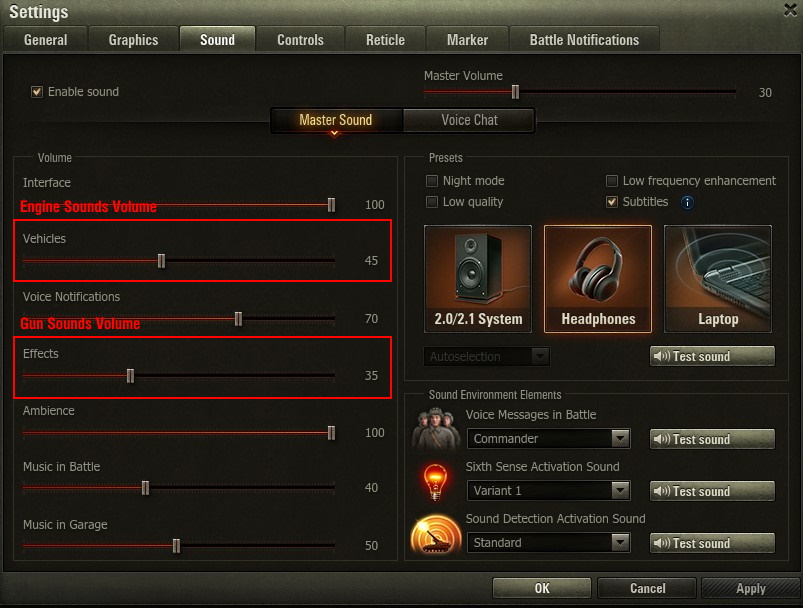
Volume is controlled separately for guns and engines from within the game’s sound settings menu.
RECOMMENDED SETTINGS:
Vehicles: ~80-100%
Effects: ~60-80% (suggested to be around ~20% lower than the “vehicles” slider)
IMPORTANT: In case the mod does not function after an update
Assuming the mod has been installed correctly, you will be prompted to restart your game on the first startup with the mod enabled. This causes the following files to generate automatically:
C:GamesWorld_of_Tanksres_mods\engine_config.xml
C:GamesWorld_of_Tanksres_mods\audiowwaudio_mods.xml
If you experience issues with sounds after installing a new update, deleting these two files and starting up the game again + following the popup instructions (click shutdown/restart) will cause these two files to refresh, which should fix most of these issues.
IMPORTANT: In case reload sounds do not function after an update
Due to the new caching feature introduced in Update 1.27.1, reload sounds will sometimes fail to appear in-game, even if installed correctly.
If modded reload sounds stop functioning in-game (assuming you have installed the mod correctly), go to your WoT install directory (by default: C:GamesWorld_of_Tanks_EU) and delete the “data.wgpdc” file (may be displayed without file extension, i.e. just a file named “data”). Alternatively, performing the “Check and Repair” function in WGC (under Game Settings) will also clear the game cache, fixing the issue.
Installation
To install, open the downloaded .ZIP file, then extract the included “mods” folder to your WoT install directory (for example: C:GamesWorld_of_Tanks).
Once this is done, start your game and follow the popup instructions (click shutdown/restart).
Please carefully follow the install instructions above to ensure proper functionality of the mod. The following folders (+ their included contents) MUST be present for the mod to function, so if you are having trouble with the mod, please ensure these folders are present after completing the install process:
C:GamesWorld_of_Tanksmods\zorg_sounds
C:GamesWorld_of_TanksmodsconfigsPYmodsBanksLoader
C:GamesWorld_of_TanksmodsconfigsPYmodsSoundEventInjector
If any of the above folder(s) are missing, please make sure to follow the mod install instructions properly. If the modded sounds still do not work even with all of the above folders present, check to make sure no other mods are conflicting with this one.
Credits:
FastestClassic